How to get paid apps and games for free for iDevices

Today I want to show you how to get paid app and games that sale on iTune for free.

Tongbu download paid Applications and Games on App store for Free!!!

Many games and applications are upload into the App Store , Some of those games and applications are free to download while some need to pay average amount and some are also expensive.

How reboot( soft reset) your Nokia Lumia all model

Don't worry when your lumia phone hanged, or got stuck or screen freeze. I'll tell you the easy ways to solve it.

How to create a playlist in Nokia Music (Nokia Lumia)

Here is some trip I want to show you to day. I think someone maybe know about this, but someone maybe not.

Windows 7 USB/DVD Download tool(also work with windows 8)

Window 7 USB/DVD Download Tool is a program that allow you to create bootable USB or DVD tool.

Thursday, March 20, 2014

How to download games or apps size more than 50MB on iOS devices using cellular Data(3G)


Now you can download any apps and games from appstore using cellular Data no need to change to wifi even though the size in more than 50MB។


 Before you can do that you need to install one tweaks first "3G unrestrictor". How to install "3G unrestrictor" :
  • Open Cydia  than add new source by press on manage​ >​ source​ >​ edit​ >​ add​ after that please type​ http://apt.178.com
  • Find the word “ 3G Unrestrictor 5 (iOS 7 &6)​ than install it​ after install please Restart​ Spring​ Board
  • Open 3G unrestrcitor on the Homescreen​ than press on Edit​ on the left side​ and press " + " ​​after that please select some application, example App​ store​ or​ Youtube​។

I hope this article can help you. Please try it you self and ask by comment below if you got the problem.

Friday, February 28, 2014

How do I install apps from an SD card?

It's easy to download apps and games from the Windows Phone Store and install them on your phone, but you can also transfer, or sideload, them from an SD card to your phone (if your phone supports an SD card).
To sideload an app or game, you'll need to have an SD card that contains one or more Windows Phone app files, also known as .XAP files. You can download .XAP files to your PC, and then move the files to the phone's SD card.


To download .XAP files from the Windows Phone Store on the web
  1. Open a web browser and go to www.windowsphone.com.
  2. Click Apps + Games, and then click the app you want to download.
  3. Scroll down on the webpage, and then click Download and install manually (below the app requirements and supported languages).
  4. When prompted, save the .XAP file to a location on your computer, SD card, or storage device.

Note
If you download the .XAP file to a location other than an SD card supported by your phone, you'll need to move or copy the file to an SD card to install it on your phone.

To install apps and games from your phone's SD card

  1. Insert an SD card that contains one or more .XAP files into your phone.
  2. On Start Start button, tap Store Marketplace tile, and then tap SD card.

    Note

    If you've just inserted the SD card or added the .XAP files, you might need to wait a few minutes before you can access your SD card from the Store.
  3. Select the apps you want, and then tap Install.

    Notes

    • Apps that can be installed are listed under Compatible apps.
    • You'll need to have the latest version of the .XAP file from the Store on your SD card before you can install it. If it isn't the latest version, it'll be listed underIncompatible apps.
  4. Installed apps appear in the App list and games appear in the Games Hub. Depending on the specific app or game, you'll be able to use them as follows:
    • Free apps and games can be used immediately.
    • Paid apps and games that have a trial will be available as a trial version that you can purchase later.
    • Paid apps and games without a trial must be purchased before you can use them.

Reference: windowsphone 

Wednesday, February 19, 2014

Save iPhone's battery life with "BattSaver" Tweak


Are you boring in charging your iPhone more than 2 times per day? BattSaver is a tweak that can help you to save you iPhone's battery life to use more longer. In this tweak you can also get information about charger cycle count, temperature of your iPhone, max capacity, time remaining and other more information about battery.


How to add this tweak:
  • Open Cydia > Source > Edit > Add > http://repo.biteyourapple.net/ > Add​ Source​ 
  • Press on Search, then type BattSaver​ for​ iOS​ 7​ in search box
  • Select then Install
  • Enjoy it.

Wednesday, January 22, 2014

Convert video file to animated gif

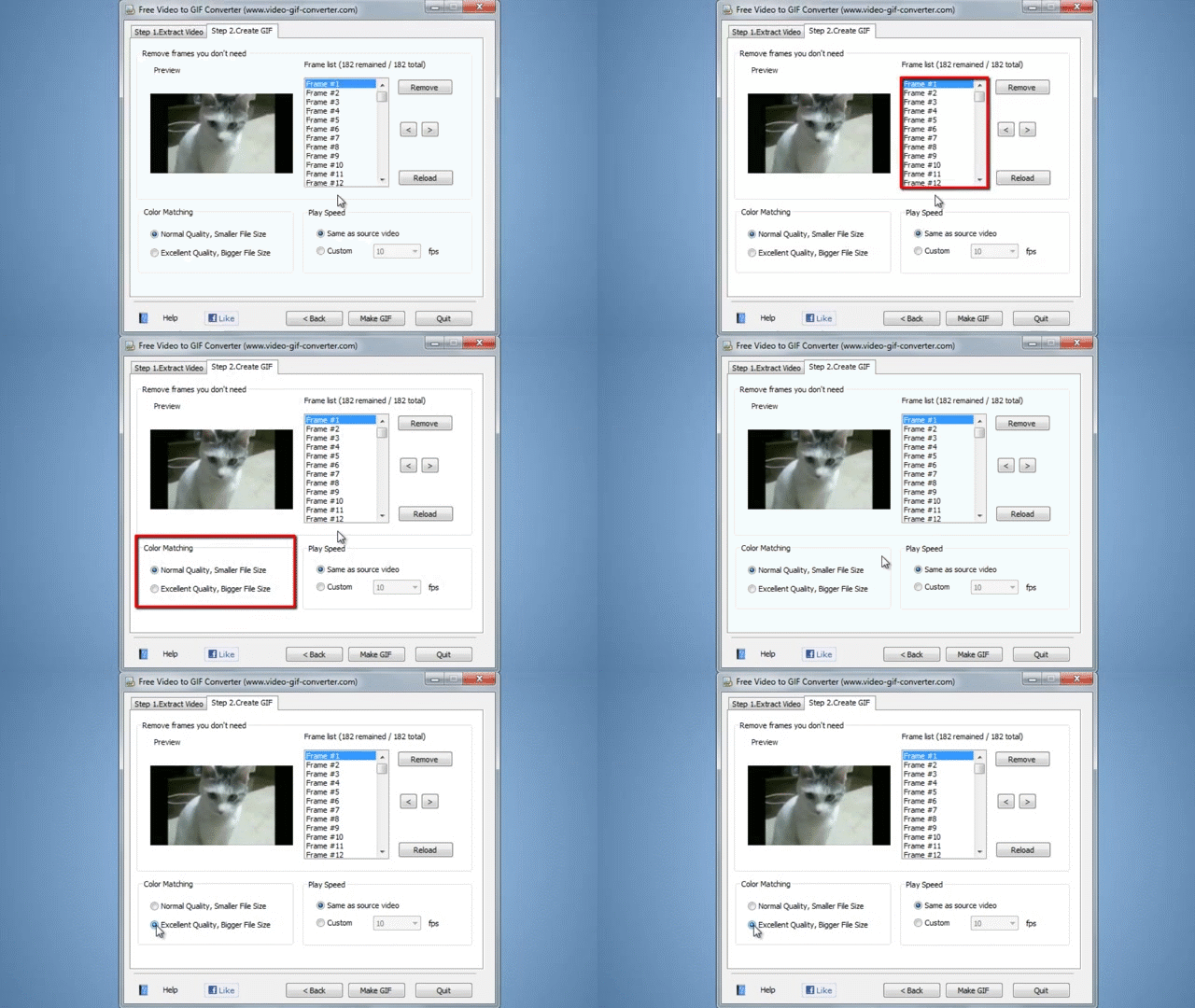
Gif ( Graphics Interchange Format) is a bitmap image format with extension ".gif". You can use this file to put on your website, application interface and slide show to make it more interesting. Free Video to GIF Converter is a software convert video file to animated gif. This application can support with 6 types of video files: avi, mp4, wmv,mov,flv and 3gp etc. For download this software click here.
Follow 5 steps below to convert videos file to gif:
1. Open the program and click browse video


2. Click next


3. Under Step 2 Create GIF tab, remove frames you don't need. Choose color matching either: Normal or Excellent Quality.

4. Click "Make GIF"


5. If do you want to open it now, click "Yes".


Remember if you use Windows 7 to Windows 8.1 please run this file on web browser.
Reference: WikiHow.

Monday, January 20, 2014

How to get paid apps and games for free

Today I want to show you how to get paid app and games that sale on iTune for free.

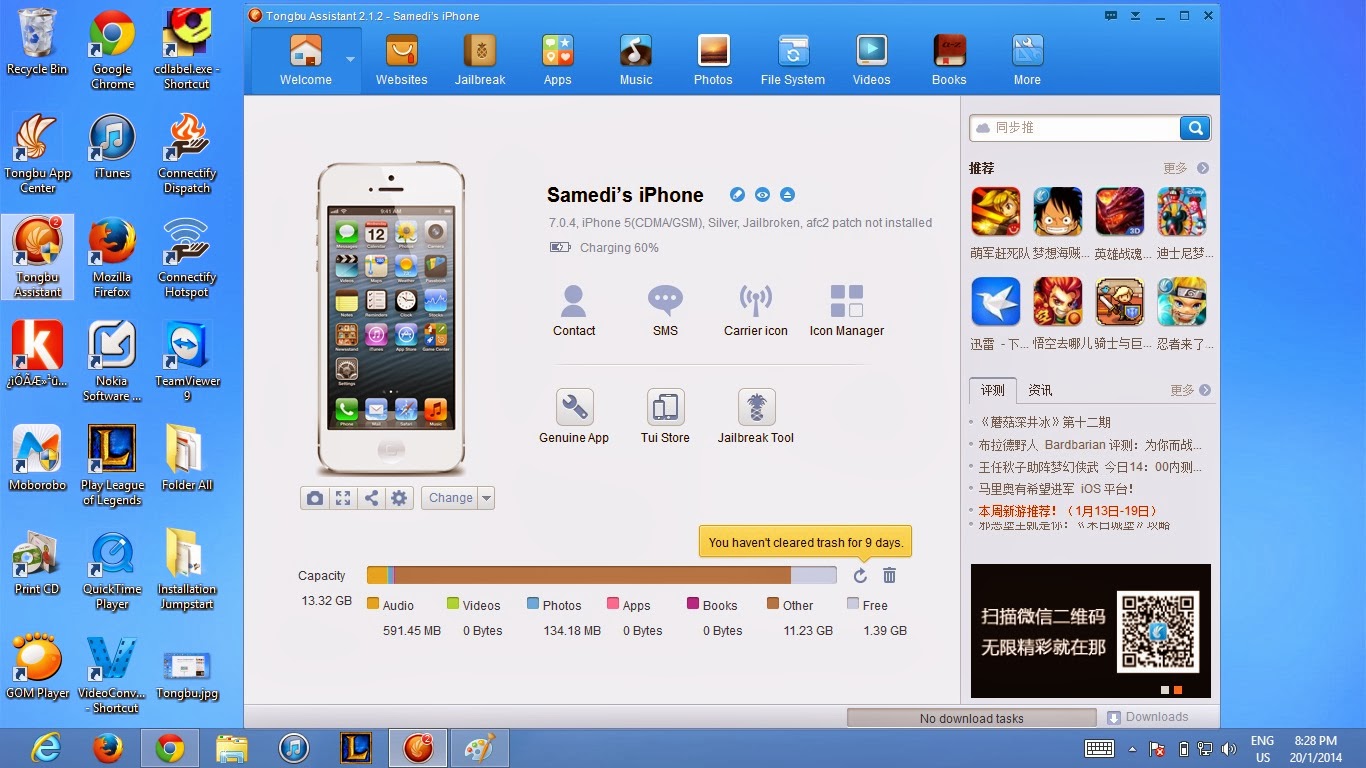
1. First of all you need to download Toungbu and install on your computer, for download click here
and click on the green button that has pineapple icon


2. After install already please double click on icon Tongbu Assistant on you desktop,  


3. When the Toungbu Software is runing you'll see the message that inform you to connect your iPhone\iPad\Touch  to PC via USB to start. follow this message you'll see like picture below


4. Now click on Apps menu at the Menu task-bar on the top(1) after that click on bird icon at the left side(2) and type what apps or games that you want to install in search box(3) then click on search button(4)

5. After click on search button if it has the software name that you type in search box it'll show you, then choose your device if you use iPhone or iPod touch please click on iPhone but if you use iPad please click on iPad, after choose already. It'll filter only apps or game that support with you device, then move you cursor on the icon of apps or games that you want to download, the download button will appear after that click to download


6. After download already it'll install on your device automatically but if it's not install auto please click on the apps button at the left side, under Library and above the Updates button, then click install. After installation is finish you can unplug you device and enjoy using it.


It just some knowledge that I know  and I want to show you, please don't mind if my English grammar not well.

After download by this software already if you think you like it please support developer by purchase it on iTune to give the strength for them to develop other games and apps. 


Enable Slow Motion on iPhone 5, 5c, iPad Air and other iDevices (JailbreakDevice)


Slow Motion is a new feature for iPhone 5s. Do you like slow motion feature on iPhone 5s ? Without buying new iPhone5s you can using this feature, do you believe? 
With So-Mo Mod tweak you can use Slow Motion on you iPhone 5c, 5 , iPad and some other iDevices.


Follow the steps below help you to use Slow Motion:
(your device must jailbreak already)
1. Go to Cydia and type " Slo-Mo Mod" in search box


2 Select it and install, after install please restat


3. Open your Camera, you'll see Slow Motion on you Camera feature


4. You also can configure the slow motion speed and other in setting --> Slo-mo Mod


Note: Burs Mode tweak also include when you download Slo-Mo Mod. 


Sunday, December 29, 2013

The Rule of Thirds.


fig1One of the most popular 'rules' in photography is the Rule Of Thirds. It is also popular amongst artists. It works like this:
Imaginary lines are drawn dividing the image into thirds both horizontally and vertically. You place important elements of your composition where these lines intersect. I've even made a little diagram for you (fig 1).
As well as using the intersections you can arrange areas into bands occupying a third or place things along the imaginary lines. As you can see it is fairly simple to implement. Good places to put things; third of the way up, third of the way in from the left , you get the idea. Duff places to put things; right in the middle, right at the top, right at the bottom, away in the corner.
Using the Rule of Thirds helps produce nicely balanced easy on the eye pictures. Also, as you have to position things relative to the edges of the frame it helps get rid of ' tiny subject surrounded by vast empty space' syndrome.
One last thing about the Rule of Thirds for the time being. Once you have got the hang of the Rule of Thirds you will very quickly want to break it ! This is fine. As I said earlier these 'rules' are best used as guidelines and if you can create a better image by bending or ignoring rules then fire away.
The Rule of Thirds is fairly structured but there are a great many methods you can employ which rely on your ability to 'see' things and incorporate them into your composition. Next up we will look at some, but by no means all, of them.


Thursday, December 26, 2013

Tongbu download paid Applications and Games on App store for Free!!!

Many games and applications are upload into the App Store , Some of those games and applications are free to download  while some need to pay average amount and some are also expensive . To get the program to charge them without spending money I will introduce a program called Toungbu. Toungbu was developed by Chinese and this program allows us to download many applications and games for free.It no need to Jailbreak and also support from  iOS 4 up.


Wednesday, December 25, 2013

Total Conquest now available on windows phone and Windows

Total Conquest now available on windows phone store.Total Conquest in the Windows Phone Store (QR code below) for free. Download size clocks in at 158MB for phone and works on 512MB devices. The Windows 8 version comes in at 186.6MB. You can get it for Windows 8 in the Windows Store, also for free.


Sunday, November 3, 2013

How reboot( soft reset) your Nokia Lumia all model

Don't worry when your lumia phone hanged, or got stuck or screen freeze. I'll tell you the easy ways to solve it.      Only press and hold the "volume down" and the "power button" together about "10 second" until your phone vibrates release volume down button and power button wait until your phone restart already.
 Continue enjoy with your phone without worry.


Wednesday, October 2, 2013

How to create a playlist in Nokia Music (Nokia Lumia)

Here is some trip I want to show you to day. I think someone maybe know about this, but someone maybe not. If you are the one who don't know about how to create playlist in Nokia music please watch this video below:

Thursday, April 11, 2013

Windows 7 USB/DVD Download tool(also work with windows 8)


Window 7 USB/DVD Download Tool is a program that allow you to create bootable USB or DVD tool.
INSTALLATION


TO INSTALL THE WINDOWS 7 USB/DVD DOWNLOAD TOOL:
  1. Click to open the Windows 7 USB/DVD Download tool installation file.
  2. When you are prompted to either save the file to disk or run it, choose Run.
  3. Follow the steps in the setup dialogs. You'll have the option to specify where to install the Windows 7 USB/DVD Download Tool.
NOTE: You need to be an administrator on the computer you are installing the Windows 7 USB/DVD Download tool on. The tool requires the Microsoft .NET Framework version 2.0 or higher.
SYSTEM REQUIREMENTS 
  • Windows XP SP2, Windows Vista, or Windows 7 (32-bit or 64-bit)
  • Pentium 233-megahertz (MHz) processor or faster (300 MHz is recommended)
  • 50MB of free space on your hard drive
  • DVD-R drive or 4GB removable USB flash drive
    Click heere to know How to use this program
    Download: click here

    Reference : Microsoftstore

Tuesday, April 9, 2013


Amazing Spider-Man Review: Web slinging action for Windows Phone 8

It is what many windows phone 8 user waiting for. Now it available on windows phone store. Amazing Spider-Man is a famous action games. It has a nice graphic with interesting action. unfortunately it can't play on windows phone 7 serial include 7.8.
Try this on your windows phone 8 right now to get fun.


The Amazing Spider-Man costs $6.99. Get it here at the Windows Phone Store. File size: 565 MB (requires a device with 1 GB of RAM and approximately 3 GB of space to install)


METAL GEAR RISING: REVENGEANCE


METAL GEAR RISING: REVENGEANCE


Genre:  ActionStealth
Release Date: 2/19/2013
Publisher: Konami Digital Entertainment, Inc. (KDEI)
Developer: 
Platinum Games
Play one: PS3, Xbox 360

Metal Gear Rising: Revengeance is multi-platform action game and part of the Metal Gear series. The stealth elements from previous games have been removed and the setting has been changed. The game now centers around swordfighting and features an advanced cutting system.The gameplay focuses on fighting enemies using a sword and multiple subweapons to perform combos and counterattacks.
more information: click here


Monday, April 8, 2013

Copy files to a Windows Phone 7, 7.5 and 7.8 device in Windows Explorer


Don't get me wrong -- I really enjoy using Zune to listen to music on my desktop computer. When all I want to do is quickly drop a couple of songs or video clips onto my Windows Phone 7 device, however, it's a bit overkill. While my humble little Palm Pre has a USB mass storage mode which lets me copy files onto it like it was any other external hard drive, WP7 devices aren't quite as accessible.

Fortunately, there's an easy remedy -- and it only requires spending a minute in your registry. Make sure you've got the Zune desktop app installed before beginning. Now, on with the hacking!


  • Press Win+R to display the run dialog box, type regedit.exe, and then click ok.
  • On Vista and Windows 7, you may receive a UAC prompt -- click yes to proceed.
  • When the registry editor opens, drill down toHKEY_LOCAL_MACHINE\SYSTEM\CurrentControlSet\Enum\USB
  • Press Control+F to display the registry search dialog
  • In Find What, type zunedriver -- uncheck data box to make searching faster, then click Find Next

    • Regedit will jump to the correct key -- now you need to click to the Device Parameters key above it
    • In the right pane, double-click ShowInShell and change its value from to 1
    • In the right pane, double-click PortableDeviceNameSpaceExcludeFromShell and change its value from 1 to 0
    • In the right pane, double-click EnableLegacySupport from 0 to 1

        • Now all you need to do is open Explorer -- look under Portable Devices, and you should see your Windows Phone 7 device listed. You can copy, move, and delete files, or create and delete folders just like you would on any other drive. Supported media is playable in the WP7 Zune app, too!

          Note: close Zune if you wanna use this function to copy or past files to your windows phone device.


      Original from: here

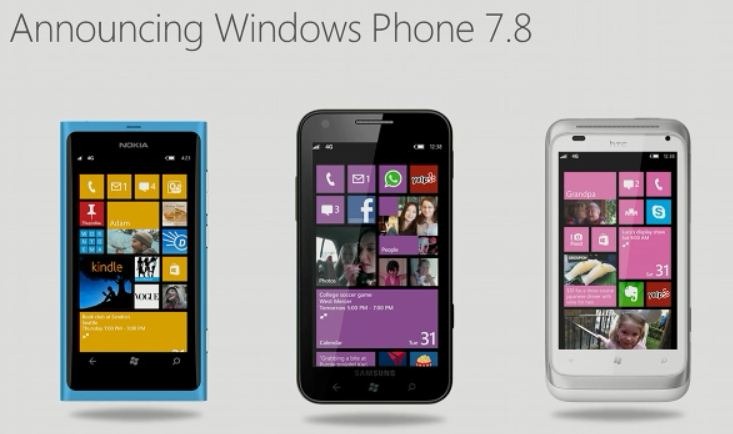
Wanna update you windows phone 7.5 to 7.8?


Now I wanna to shared some experiences to update windows phone 7.5 to 7.8 without waiting it available on Zune for you device. I try with my HTC HD7 already it easy to update and work fine with my phone.
Before try to using it please read all information carefully. more information

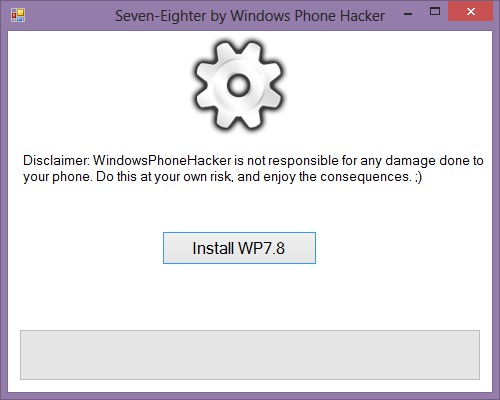
This tool will install the official, RTM Windows Phone 7.8 update today, right now. It's easy. Just click Install 7.8, then select the desired language packages. Then wait.
Basically, the tool acts as a wrapper for the UpdateWP file, and contains all the updates and their language packs. Using this tool has the same risk as using the manual cab method, so keep in mind that I'm not responsible for the chance something goes wrong, despite that being very low.
Download it over here. Please do not hotlink, link to this page instead. Thanks. Also, if you have issues with it, feel free to tinker with the source code to find your problem. It's a huge mess, but it should be easy enough to follow and patch if necessary.
If you have issues with about or wallpaper not opening, you have language pack issues. There's info here about that.
reference: Windowsphonehacker